



Modern enterprise security is shifting from perimeter trust to identity-centric, continuously verified access. This guide explains how to implement Zero Trust Network Access (ZTNA) in Microsoft Azure, moving from legacy VPN models to policy-based access control.
Executive Summary
This guide provides a technical overview of implementing Zero Trust Network Access (ZTNA) in Azure. It outlines the architectural shift from legacy VPNs to identity-centric gatekeeping, then covers Azure engineering best practices, secure cyber-physical edge integration patterns, and a mapping of these controls to major regulatory and assurance frameworks.
1. The Paradigm Shift: Understanding ZTNA
The Obsolescence of Castle-and-Moat Security
The legacy network security model assumes a firewall can draw a neat perimeter around an organization's assets. Anything inside is implicitly trusted; anything outside is treated with suspicion. Cloud computing, third-party integrations, bring-your-own-device, and remote vendor access have eroded this boundary. Once an attacker or a compromised device penetrates the outer firewall, a flat internal network enables lateral movement, increasing both the likelihood and potential impact of a security event.
The Inherent Risks of Legacy VPNs
VPNs have historically served as a primary mechanism for remote access, but they introduce architectural vulnerabilities:
- Broad network access: VPNs commonly grant IP-level access to entire subnets rather than the specific application required.
- Credential abuse: Attackers target VPN endpoints. Compromised credentials can enable access to internal subnets, and stolen credentials are a common breach initiation vector.
- Outdated technology bases: Many legacy VPN appliances rely on aging code bases that are frequently exposed to critical vulnerabilities.
- Lack of continuous verification: After a VPN tunnel is established, contextual validation of device posture and session behavior is often limited.
The Three Pillars of Zero Trust
Zero Trust shifts access from location-based trust to context-aware, continuously verified access. It is commonly built around three principles:
- Verify explicitly: Authenticate and authorize access requests using user identity, device health, service context, and real-time risk signals.
- Use least privilege access: Apply Just-In-Time and Just-Enough-Access controls with risk-adaptive policies and strong data protection.
- Assume breach: Minimize blast radius through segmentation, end-to-end encryption, and analytics that identify anomalous behaviors.
| Security Aspect | Legacy Virtual Private Networks (VPN) | Zero Trust Network Access (ZTNA) |
|---|---|---|
| Trust model | Implicit trust based on network location (inside the perimeter). | No implicit trust; verify explicitly regardless of location. |
| Access scope | Broad access to entire subnets or network segments. | Granular, application-level access restricted to authorized resources. |
| Authentication | One-time verification at the perimeter boundary. | Continuous, context-aware authentication and session evaluation. |
| Lateral movement | Easy traversal across subnets once inside the network. | Prevented via strict network microsegmentation and logical boundaries. |
| Device posture | Rarely verified or limited to basic domain checks. | Continuous checking of device compliance, updates, and risk levels. |
2. Azure's Zero Trust Engine: Identity as the Primary Perimeter
In the cloud, identity replaces the traditional network boundary as the primary security perimeter. Microsoft Entra ID becomes the central directory and security engine for controlling both human and service identities and access policies.
Microsoft Entra Conditional Access: The Policy Engine
Entra Conditional Access evaluates real-time signals from multiple sources and makes automated, context-aware decisions during authentication attempts.
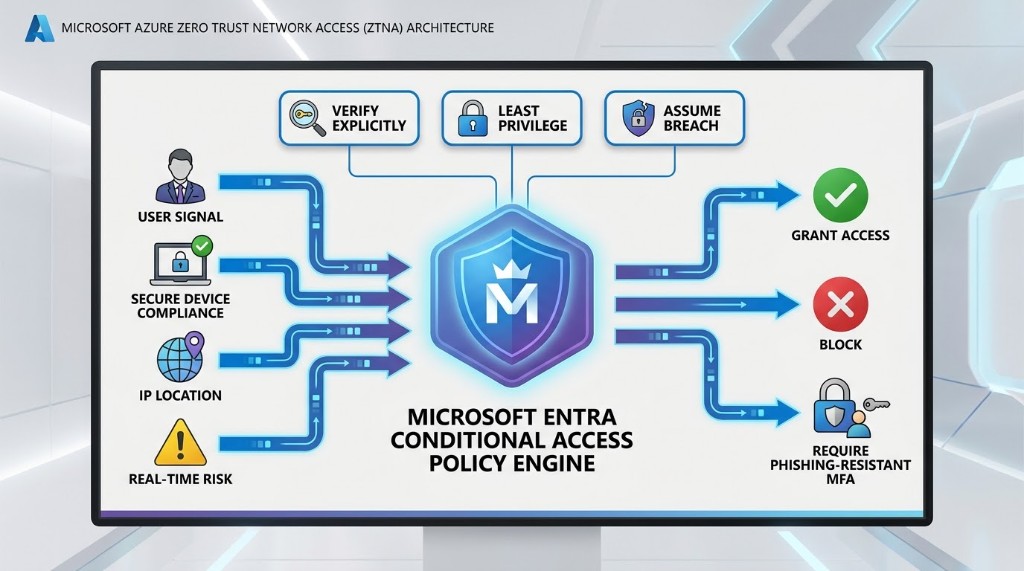
Key Access Signals Analyzed by the Engine
- Identity and role context: Target controls to users, groups, or administrative roles, including support for non-human agent identities.
- IP and geographic location: Define trusted network ranges or block entire countries and regions.
- Device health and compliance: Verify registration, management (for example via Intune), and compliance status.
- Application sensitivity: Apply stronger verification for critical databases and administrative portals.
- Real-time risk detection: Integrate signals from Entra ID Protection to detect sign-in risk and anomalies such as compromised credentials or impossible travel.
- Cloud app monitoring: Inspect and restrict risky actions using Defender for Cloud Apps session-level integration.
3. Cloud & Architectural Best Practices in Azure
Mandatory and Phishing-Resistant Multi-Factor Authentication
Protect administrative and user access by enforcing phishing-resistant authentication methods. Practical baselines include FIDO2 security keys, passkeys, Windows Hello for Business, and certificate-based authentication.
- Mandatory MFA enforcement: Apply MFA across administrative interfaces, command-line interfaces, scripts, and development tools.
- Phishing-resistant MFA baselines: Use hardware-backed cryptographic keys and client-bound authentication to reduce token theft and session hijacking risk.
Lowering Administrative Exposure and Securing Privileged Access
- Separation of duties: Use dedicated cloud-only admin accounts for directory management tasks.
- Exclude synced identities from Tier 0: Do not synchronize high-privilege credentials from on-premises Active Directory.
- Just-In-Time activation via Privileged Identity Management (PIM): Use eligible role assignments, multi-factor challenges, and time-bound activation.
- Break-glass emergency accounts: Configure at least two emergency access accounts excluded from standard policy requirements.
- Privileged Access Workstations (PAWs): Use hardened workstations protected from public internet exposure.
Right-Sizing Privileges and Eliminating the Permissions Gap
- Microsoft Entra Permissions Management: Use CIEM-style approaches to discover, monitor, and right-size privileges across cloud environments.
- Permission Creep Index (PCI): Track over-privilege signals and remediate excessive access automatically.
Transitioning User-Based Service Accounts to Workload Identities
- Workload identity migration: Move automated workflows and non-human processes to workload identities like Managed Identities and Service Principals.
- Eliminate static secrets: Use Managed Identities so resources can authenticate without stored secrets or frequent manual rotations.
4. Azure Network Security: Segmenting Workloads
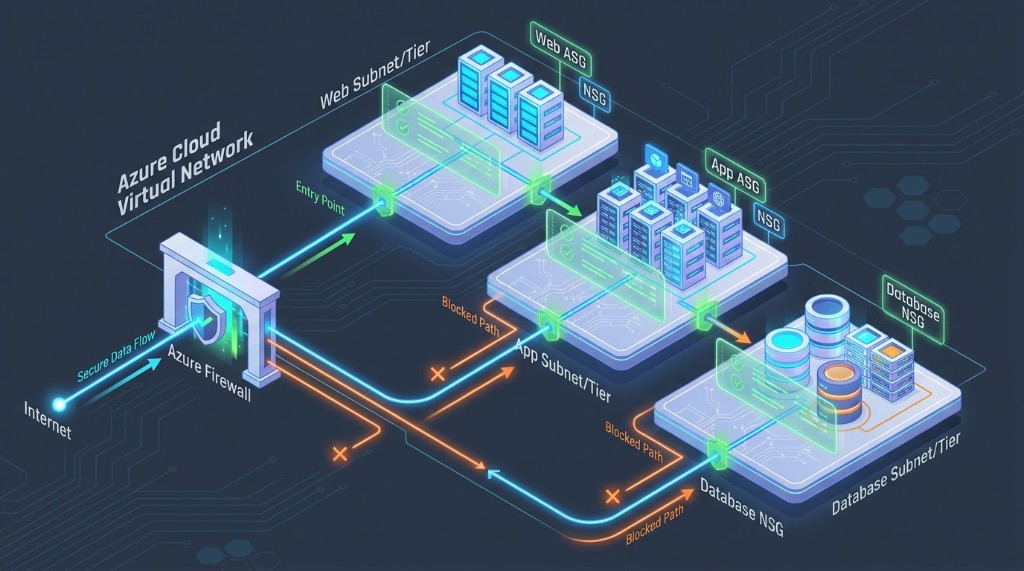
Identity remains the primary perimeter, but network microsegmentation adds depth by limiting lateral movement when identity is compromised.
Segmenting Workloads with Network Security Groups (NSGs)
- Default-deny posture: Avoid broad allow-all rules.
- Block administrative ports from the internet: Route admin access through Azure Bastion, private endpoints, or secure site-to-site connections.
- Apply NSGs consistently: Prefer subnet-level NSGs to reduce conflicting rule evaluations.
Logical Grouping with Application Security Groups (ASGs)
- Intent-based rule design: Use logical group names rather than static IP allowlists.
- Dynamic scaling: New workloads inherit rules automatically based on ASG membership.
Advanced Traffic Inspection and Visibility
- Integrate Layer 7 inspection: Pair NSGs with Azure Firewall for application-layer filtering, TLS inspection, and deep packet analysis.
- Use VNet flow logs: Enable VNet flow logs to capture traffic state and throughput for monitoring, investigations, and audit evidence.
5. Operational Technology (OT) and Physical-Digital Convergence
In smart buildings and critical facilities, the Building Management System (BMS) controls physical systems such as HVAC, lighting, access control, elevators, and life-safety. As IT, OT, and IoT networks converge, physical systems become high-value cyber targets.
The Vulnerabilities of Legacy Building Protocols
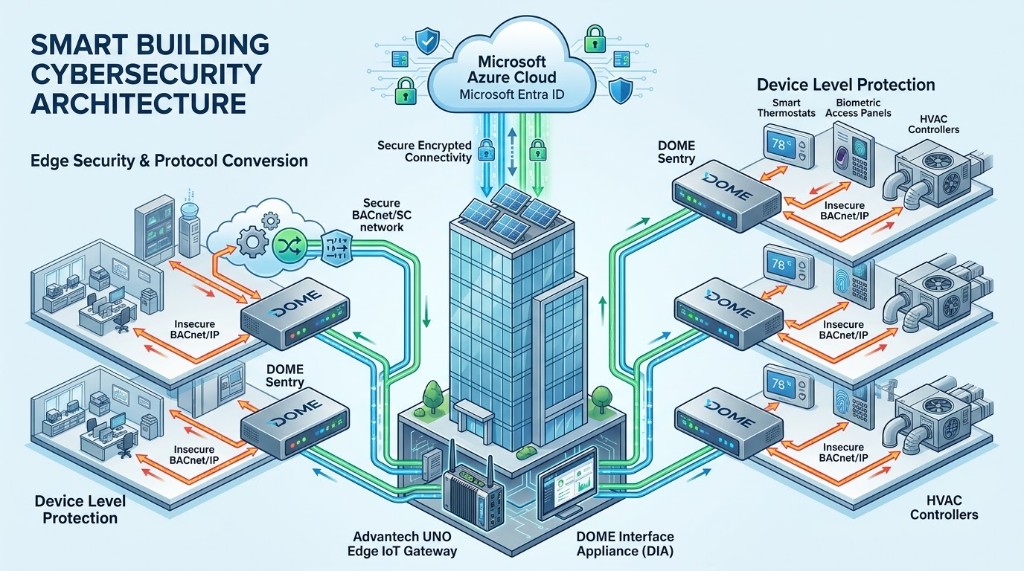
Legacy building automation protocols such as BACnet/IP, Modbus, and LonWorks were originally designed for closed networks. They typically lack built-in security controls, sending commands and device setpoints in plaintext without authentication or integrity checks. Attackers can exploit this to manipulate physical operations and pivot into enterprise networks after initial access.
Securing the Cyber-Physical Edge
- DOME Sentry integration: Use standalone hardware devices at the network edge to encrypt, authenticate, and protect legacy components.
- BACnet Secure Connect (BACnet/SC): Transition from plaintext BACnet/IP to BACnet/SC using WebSockets and TLS for mutual authentication and encrypted messaging.
- Onboarding via DOME Interface Appliance (DIA): Use edge gateways to manage security credentials, coordinate zero-touch onboarding, and log device activity locally.
Automated Threat Isolation and Response
- Deep Packet Inspection (DPI): Perform real-time protocol-aware inspection to differentiate authorized physical commands from malicious tampering.
- Automated incident playbooks: Use SOAR playbooks to isolate compromised sensors and switch controllers into fail-safe manual modes while maintaining uptime and notifying engineering teams.
6. Mapping to Global Regulatory Standards
Implementing Azure ZTNA and securing converged OT perimeters helps organizations satisfy requirements in major compliance frameworks.
NIS2 Directive (European Union)
- Article 21 security measures: Mandatory device-level authentication, robust encryption, and granular access controls.
- Supply chain and vendor accountability: Strong vendor remote-access controls and controls that support accountability for third-party activity.
- Mandatory incident reporting: Central logging and edge analytics to meet early warning and notification timelines.
NIST Cybersecurity Framework (CSF) 2.0 (United States)
- Govern: Document security strategies and clarify responsibilities with continuous risk assessments.
- Identify, Protect, Detect: Use asset and API discovery, microsegmentation, role-based access control, and continuous monitoring to align with NIST guidance.
U.S. Department of Defense (DoD) Zero Trust Strategy
- Identity: Entra ID enforcing phishing-resistant authentication, role segregation, and PIM workflows.
- Devices: Microsoft Intune verifying compliance, posture, and patch status before access is granted.
- Networks: Logical zones using subnet-level NSGs, ASGs, and hub firewalls.
- Applications & Workloads: Harden APIs and migrate user-based service accounts to secure workload identities.
- Data: Classification, sensitivity labels, and Key Vault encryption.
- Analytics & Automation: Automated threat detection and incident response playbooks.
- Environment: Secure cyber-physical environments and edge industrial systems using cryptographic hardware sentries.
Microsoft Cloud Security Benchmark (MCSB) v2
- Technical baselines: Expanded Azure Policy coverage to enforce secure configurations across security-critical domains.
- Confidential computing and AI: Recommendations for securing sensitive workloads and governing administrative access to AI applications and automated agent environments.